It’s been almost three years since I built my first custom PC and discussed it on this here money blog. In recent time, that Intel i5-2500K-based desktop has been used almost exclusively by our middle-school-aged daughter (as our old Dell PC, circa 2003, eventually went bye-bye). Should’ve seen that coming, right?
Lisa and I have our own laptops, so we’re covered if either of us want to do basic home and office stuff. But if we want to game, we’re again relegated to the PS3 or PS4 … unless we feel like pushing Dear Daughter off the PC for a while. (Never fun for anybody, really.)
The obvious solution, if you’re a geek like me? Build a new PC! Merry Christmas to me!
Why Build? Why Not Buy Premade?
Because it’s fun, mostly. And because there are certain features I want on (and not on!) my PC. And, yes, because sometimes your inner geek needs to come out and play.
But beyond that, let’s consider my First Rule of PC Building:
The more performance-heavy you want your PC to be, the more money you’ll save by building it yourself.
Put another way: If you’re someone who’s only into light gaming, office apps, and watching videos on the ‘net, then odds are good you’d be better served (if price is your main consideration) to simply buy a Dell refurb unit and perhaps add a low- or mid-range graphics card to it. (That’s assuming you need a discrete graphics card at all. The integrated graphics in today’s Intel processors are pretty good.)
I built a budget PC like this for my mother-in-law earlier this year, and when all costs were tallied up (she had no need for a discrete graphics card), it cost her a smidge under $460. (That’s parts only; my handful of hours of labor to research and build were gratis. She also reused her current monitor, keyboard, mouse, and printer.)
Could she have gotten a Dell refurb more cheaply? Yes.
Would we have known the quality of the parts Dell used? Nope.
Would it have come with a bunch of useless, memory-clogging bloatware? Yep.
So that $460 got my MIL:
1) Good, quality PC components;
2) A known level of expandability down the road; if required;
3) A crapware-free PC; and
4) The knowledge that if something goes haywire with the machine, or she just has a question, she can contact the dummy who built it and he can be on site pretty quickly if needed.
If she’d gone the Dell route, it wouldn’t have hurt my feelings. But she seems quite pleased with her custom-built, budget PC. And I think she got a pretty solid Intel-based machine for her money.
Building My New Gaming Machine
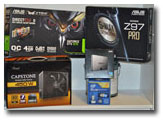 Alas, because I want to play current games at high settings, building a sub-$500 PC was not in the cards for me. I also needed new peripherals (monitor, keyboard, and mouse) and had pretty specific desires in those areas. Which means more costs to tack on.
Here’s my build list, as completed, with my prices in parentheses:
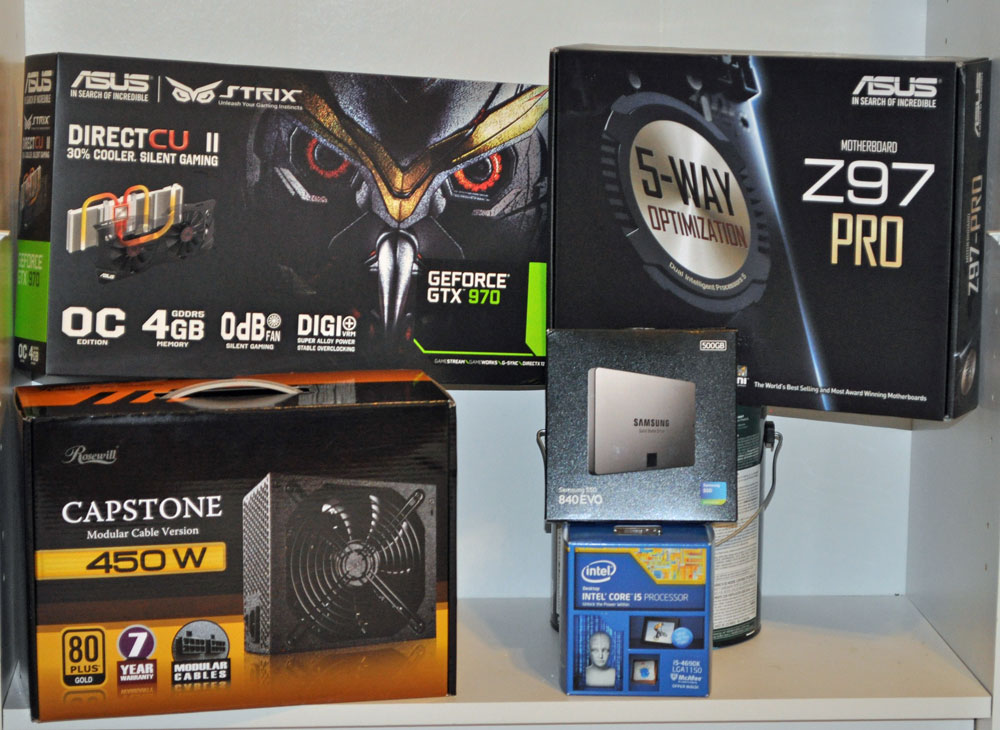
CPU: Intel Core i5-4690K 3.5GHz Quad-Core Processor ($184.99)
Motherboard: Asus Z97-PRO ATX LGA1150 Motherboard ($152.99)
Memory: G.Skill Sniper Series 8GB (2 x 4GB) DDR3-1866 Memory ($56.99)
Storage #1: Samsung 840 EVO 500GB 2.5″ Solid State Drive ($209.99)
Storage #2: Western Digital Caviar Blue 1TB 3.5″ 7200RPM Internal Hard Drive ($49.99)
Video Card: Asus GeForce GTX 970 4GB STRIX Video Card ($339.99)
Case: Phanteks Enthoo Pro ATX Full Tower Case ($89.99)
Power Supply: Rosewill Capstone 450W 80+ Gold Certified Semi-Modular ATX Power Supply ($34.99)
Optical Drive: Asus DRW-24B1ST/BLK/B/AS DVD/CD Writer ($16.99)
Operating System: Microsoft Windows 8.1 – 64-bit (OEM) (64-bit) ($84.99)
Monitor: Dell S2340M 60Hz IPS Panel 23.0″ Monitor ($119.99)
Wireless Network Adapter: Gigabyte GC-WB867D-I 802.11a/b/g/n/ac PCI-Express x1 Wi-Fi Adapter ($32.99)
Keyboard: Razer Blackwidow Ultimate Wired Gaming Keyboard ($99.99)
Mouse: SteelSeries Rival Wired Optical Mouse ($54.99)
Freebie: Far Cry 4 Game (Bonus w/Video Card; Value $45)
Total: $1,530
All parts except the keyboard and mouse came from Amazon and Newegg, as I have free shipping from both. Prices shown include all rebates, including the mail-in variety. (I despise mail-in rebates with every fiber of my being, but money’s money. When it’s there, you take it.)
Importantly, I was able to take my time with this build. I spaced out the purchases over several weeks to take advantage of Black Friday and Cyber Monday sales. I also used other offers which came my way during this time. (Newegg, in particular, is all about email coupon codes, if you didn’t know. So if you’re going to build a PC, get on their email list pronto. And be sure to use PCpartpicker.com to line up your components, compare prices, and sniff out any incompatibilities. It’s an insanely valuable resource.)
Notes and Comments
Space wasn’t an issue, so I had the luxury of choosing whatever size case I wanted. The Phanteks Enthoo Pro is about as big as PC cases come. It has no fancy, colored LEDs to make it look like a blinged-out spaceship (as my Cooler Master Storm Enforcer case did, which I used in my 2012 build). But the Enthoo Pro has crazy-good fans, terrific cable-routing tools (like built-in Velcro straps), and best of all, it has four easy-to-remove, easy-to-clean air filters. Since this PC will sit in the same room as our kitty-litter boxes, such filters are VITAL.
Having a solid-state hard drive wasn’t in my plans originally. However, I took the leap, thanks to the many positive reviews I read on PC-building message boards. For those who care about such things, with Windows 8.1 and other startup software on the Samsung solid-state drive, this PC goes from power-on, to BIOS, to Windows 8.1 log-in in a brisk 16 seconds. Desktop is ready immediately thereafter.
While I did purchase a Wi-Fi network card for this machine, that turned out to be unnecessary. In the week leading up to my build date, I worked up the guts to go crawling in our attic, where I wired several rooms in our house with Cat 6 cable. So my new PC’s connection is land-line fast, and the wireless card’s only job is to take up a small bit of space on the motherboard. There’s another $33 I might’ve saved.
No, It Ain’t Cheap
Fifteen hundred bucks is a bunch of money, to be sure. But drop the monitor, keyboard, and mouse (which lots of less-picky folks would reuse from old systems), and that’d shave the total down to $1,255.
When I used these same parts to piece together a built-for-you machine at a couple of online places, their prices for a near-copy build never got below $2,000. And it still wasn’t an even comparison, as those places offered only no-name, cheaper monitors, and lower-quality power supplies. And no freebie Ubisoft game.
At Dell/Alienware, it took $1,999 to get a PC with the same graphics card (GTX 970) and a slightly better CPU (i7 at 3.8GHz, vs. my i5 at 3.5GHz). But even at that $1,999 price, the Dell/Alienware machine was without a solid-state hard drive. It also had no monitor, no gaming keyboard, and no gaming mouse. Though the Alienware machine’s appearance certainly was, uh, nonstandard. I’ll give it that. If you’re into that sort of thing, maybe it’s worth the markup.
In the end, I once again had a great time building a Windows-based PC for our household. Barring breakdowns, I feel pretty strongly that my $1,500 or so outlay will keep me in gaming bliss for years to come … and that I got quite a bit more for my money than if I’d gone the prebuilt route.


 In the latest non-shocking financial survey conducted by Bankrate, we find that roughly a quarter of respondents said they had NO emergency savings. Zero, zilch, zip, nada. A further 25 percent had less than three months’ worth of expenses saved, so altogether, about half of respondents had less than three months of expenses saved up.
 I could go on and on about the scam that college debt has become, but I promised myself I wouldn’t do that again. Fact is, this country just moves from one bubble to the next, and Today’s Bubble™ is college debt.