
Kiplinger's Simply Money
Personal Finance Software
| Creator/Producer: | Computer Associates | |
| Date Tested/Software Version: | January, 2006 / Version 2.0B (1993-95; © 2001) | |
| Website: | SimplyMedia.com | |
| Price: | ~$5 |
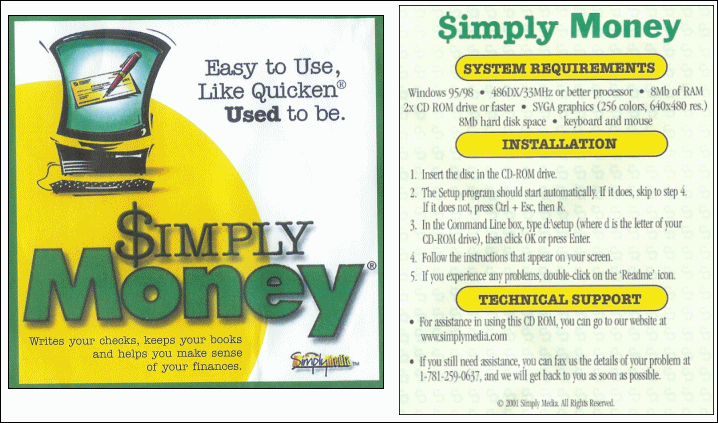
When they say "simple," they aren't kidding.
Thanks to my wife, I managed to get my hands on a free CD-ROM containing a previous version of the personal-finance program "Simply Money." The splash screen says it's called "Kiplinger's Simply Money," which I suppose means it somehow had its origins with the same company that rolls out Kiplinger's Personal Finance magazine.
Firing up Simply Money is like taking a trip back to the mid-1990s. There are no fancy, high-resolution graphics requiring high-dollar video cards. There are no 3-meg tutorial videos that you'll never watch. There are no "Portfolio Analyzer" or "Itemized Deduction Estimator" extras to clog up your toolbars and menus. This is money management at its most basic.
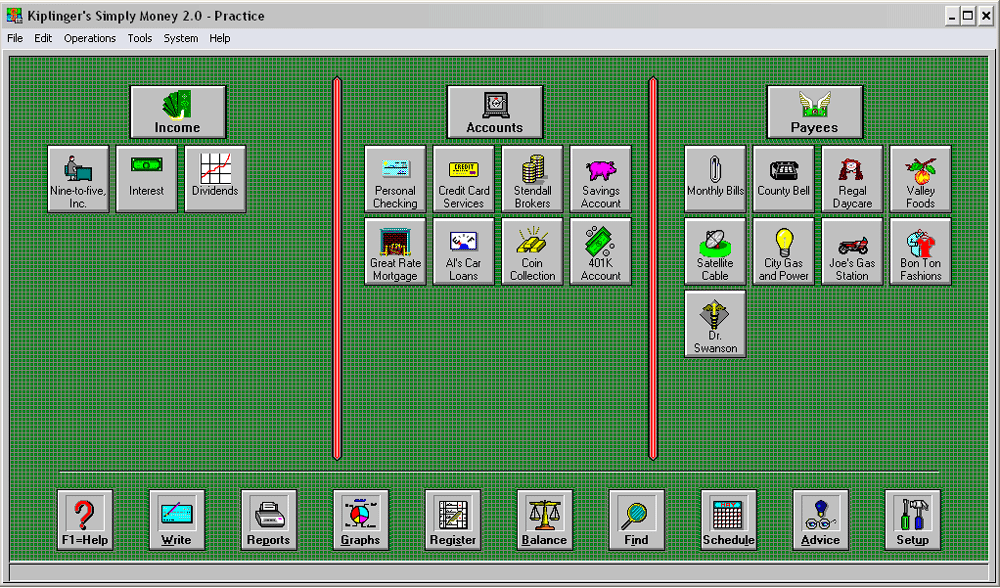
The opening Desktop Screen presents you with the usual menus (File, Edit, Operations, Tools, System, Help). The desktop itself is divided into three large horizontal sections (Income, Accounts, Payees) and one vertical section at the bottom (with buttons for Help, Write, Reports, Graphs, Register, Balance, and others). Users initiate most every common operation by clicking one of the large low-res buttons on the desktop.
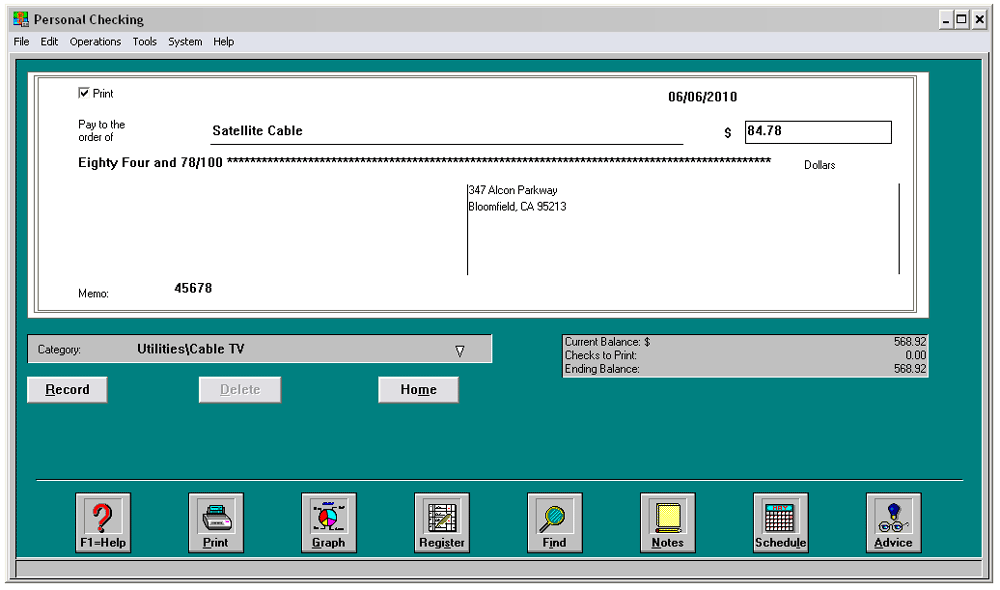
Transactions can be entered in one of two ways: Either via pop-up windows that prompt you for specific entry data, or via the familiar "check register" method of entry. Checking account entries can be done via a graphical interface which resembles a single check ...
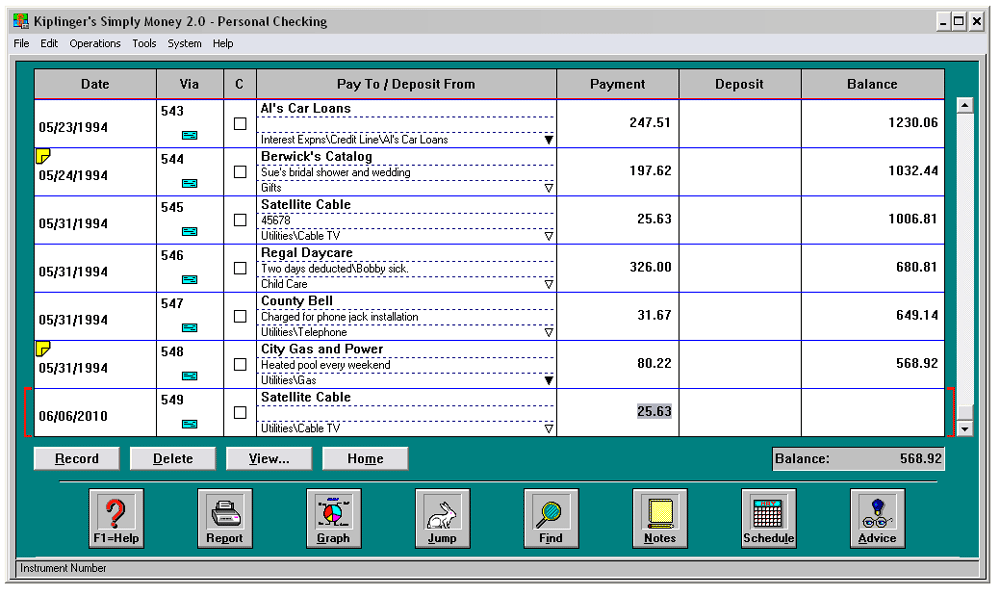
... or by the more-familiar "check register" method:
Suppose you were an employee at Nine-to-Five, Inc., and you want to enter today's paycheck and show its deposit into your checking account. From the Simply Money desktop, in the "Income" section, you could click the "Nine-to-Five" button. This would bring up a window into which you'd enter the necessary numbers. It's all shown here. Interest and dividend income is entered much the same way.
In the "Payees" section, clicking on a payee button such as "Regal Daycare" summons up the Payee Summary window. Here you can see a handful of pertinent info regarding the payee, including the address, your average payment, account number, and the total number of payments you've made to them. Pretty sweet, really.
As you get started, you can't do much without triggering Simply Money's pop-up Hint Windows. These Hint Windows are helpful at first, but a bit annoying. Thankfully, you can disble them once you've got a feel for Simply Money's operation. And unless you want to end up kicking your PC across the room, you'll want to turn off the program's sound notifications as soon as you start. (No, really. They're awful. Suited perfectly to emanate from the mono speaker of an old IBM 486, though.)
Once you've entered your transactions and data, of course, you get to the real power behind personal-finance software: the ability to compile data and generate reports. Simply Money offers about 35 standard report types, including everything from the ubiquitous Cash Flow report to Investment Performance to Tax Schedule Reports. For the record, I found just about all of the reports I regularly use in Quicken Deluxe.
Other Assorted Features
Here's a quick rundown of some other tidbits Simply Money offers:
- Nifty "Practice Mode" with pre-loaded accounts and data, so you can play with someone else's money and categories and thereby learn how things work. Allows you to get a grip on the program's operation before going to the trouble to import your own data.
- Eight pop-up financial calculators. (Loan, Refinance, Interest, etc.)
- Reads and imports the old Quicken .QIF and .QDT files, among a few others. (Not the new Quicken formats, though.)
- Categorizes expenses and generates clear Cash Flow reports ... just like a good personal-finance program should.
- Handles "split" transactions much like Quicken does; here, they're called "Distributions."
- "Schedule" feature allows you to set up recurring and future payments as well as other transactions. You can also schedule a "memo," which you can use to remind yourself of an important date.
- The program can write and print checks for you, apparently, but somehow I doubt this feature's usefulness. Who writes many checks anymore, anyway?
Summary
In short, considering the complexities to which most popular personal-finance software is striving, Simply Money is a unique offering. It's all about function and necessity. It's about getting your money-related tasks done with ease and efficiency. There is no fluff here. There is no mandatory online-transaction download, nor any ".NET Passport" data requests, nor any on-screen advertisements for related products.
As you can tell from the screenshots above, Simply Money has no fancy graphics or watch-them-once-if-at-all videos. Simply Money will allow you to track your checking and savings balances, your credit-card and loan accounts, and monitor your investments (to some degree) and track your net worth. If you don't have $50 or $80 to shell out for Quicken — and don't forget the annual upgrades that you aren't supposed to be able to do without — but you want to start managing your finances seriously, then a less-than-$10 investment in Simply Money sure looks like a good way to go, from my point of view.
As a side note, I see that the Simply Media website announces that Simply Money is bug-free. This isn't true, as I found a few problems with the Help files and the linking system therein. No big deal, though. It's the number-crunching and data-tracking that users should be concerned about, and Simply Money appears to handle those items quite nicely.
You can get your hands on a copy of Simply Money by following this Simply Media product link. I suspect the version they're offering these days is a step up, albeit probably a small one, from what I reviewed here.
Michael | January 21, 2005
(Updated January, 2026)
| Ratings are scaled 1 to 5, with 5 as the top ranking. | |
|
value: Is it worth the money? |  |
|
adaptability: Could this work for me over time? | 
|
|
usage: Is its usage intuitive? Is it professional in appearance and function? |
|
