
YNAB (You Need a Budget) PRO Budgeting System
| Creator/Producer: | Jesse Mecham | |
| Date Tested/Software Version: | September, 2008 / Version 2.5.6.0 | |
| Website: | YouNeedABudget.com | |
| Price: | $ |

As of 2012, the new standard is YNAB 4. Please take a look at my YNAB 4 review.

In case you haven't figured it out yet, your computer has the power to help you greatly improve your financial life. And Jesse Mecham's You Need a Budget Pro software (well, it's actually more of a "system") is ready to get things rolling.
Consider, for example, controlling your spending. It ain't easy to do, and in general, people suck at it. Folks cannot distinguish wants from needs on a consistent basis. And even when they can make the distinction, many times they'll go ahead and fork over for wants simply because they "deserve" it. They cannot plan ahead — at least not any farther than their next on-the-job breaktime.
And they they most certainly cannot muster much, if any, discipline when it comes to deploying their income with intelligence and efficiency.
— Jesse Mecham, YNAB Creator
We could turn to programs like Quicken and Money to help us with this, but as fantastic as they are for some money tasks, they're just too nebulous and broad to be of much use at day-to-day money planning. They focus so much on "where you've been" and "where you are" in your finances that the all-important "where you're going" got left on a streetcorner miles and miles back. Somehow, with these Giants of Personal-Finance Software, budgeting — planning your spending — got buried beneath scads of eye-candy and investment-tracking features long ago. It's now hardly an afterthought, rarely mentioned on their glossy software boxes.
Kind of reflects society at large, doesn't it?
In any case, what can we do to remedy this? Well, you can do what I've done to this point: You can use Excel or another spreadsheeting program to build and maintain monthly Spending Plans. This works really, really well . . . if you're already well-versed in the Arts of (1) Smart Money Management, and (2) Customizing and Adapting Spreadsheets to Your Unique Needs.
Alternately, you could venture into the increasingly-popular world of budgeting software. And there you'll find YNAB PRO.

It's laser-focused on one thing: Kick-butt budgeting.
YNAB PRO: Excel-Based Goodness in a Spreadsheet-less Package
Jesse Mecham (young husband, father, and a guy whom I suspect is much smarter than other people in the same room with him) first created You Need a Budget as an Excel spreadsheet ... or, more appropriately, as a system of spreadsheets. It was appealingly clean and straightforward, and revolved around his Four Simple Rules of Cash Flow Management:
- Stop Living Paycheck to Paycheck.
- Give Every Dollar a Job.
- Prepare for Rain.
- Roll with the Punches.
Initially, Jesse had to coerce me a bit to get me to try out and review You Need a Budget in its original version. But eventually I gave in. He was right all along. And I was impressed.
You Need a Budget PRO boasts standout features galore, most of which are further detailed at You Need a Budget:
- No more reliance on Excel or any other spreadsheeting program — YNAB Pro is standalone, proprietary software. It will crank out your household's money numbers perfectly with all versions of Windows.
- Unlike various other budgeting programs, YNAB Pro is a one-time purchase. No ongoing monthly fees (which I despise, by the way) or anything of that sort. Pay once and you're done. (And on your way to Budgeting Nirvana, I might add.)
- If the idea of Freedom Accounts appeals to you, then YNAB has your name written all over it. The Freedom Account concept — saving smaller amounts each month in anticipation of larger, known expenses down the road — is inherent in YNAB principles. Such common-sense saving is built right into the software's functionality. (See the Methodology section below for more details.)
- YNAB Pro comes with (self-intalls) a 48-page PDF Setup Guide. Yes, forty-eight pages is pretty stout. But this PDF isn't so much about the software, really, because there just isn't much that's complicated about the program. This manual, rather, is more like a Setup Guide for your wallet or purse. It's about getting a grip on your money and your life.
- You can try YNAB Pro without risk: Jesse offers a 60-Day Money Back Guarantee. While I suspect the odds of needing said guarantee are slim, I know Jesse is dedicated 100% to his users ... and his word.
Methodology
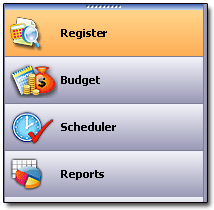
There are four main sections to the YNAB program. You access each one from a menu on the left side of the screen:
The You Need a Budget system is a pretty simple one: You budget your money on a monthly basis, assigning planned spending amounts to your particular categories (like Food - Groceries, Food - Restaurants, and so on) at the start of each month.
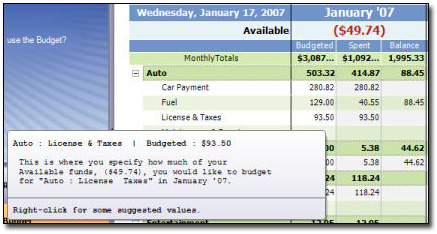
In the above screenshot from YNAB Pro's "Budget" section, for example, I've budgeted $93.50 for auto license fees & taxes for the month, and $129 for fuel, and so on. I've spent my budgeted amount for the auto license, but I've only spent $40.55 so far on fuel, so I have $88.45 remaining for that category.
How does YNAB know what I've spent? Because I've entered all my transactions (both income and outgo) in the program Register, like so:

YNAB Pro's Register Section
This "Register" portion of YNAB Pro is very much like a checkbook register; you'll have a register in YNAB for each account you use — checking, savings, credit card, or whatever.
If you've ever used a checkbook register — please tell me you have! — then you'll feel right at home. Except you won't run out of space. Or have to do any yucky math. Thankfully, YNAB crunches the numbers for you.
In the screen below, for instance, I've set up five accounts. The active account (the one I'm currently working in) is denoted by an orange tab. In this case, it's my ING Checking account:

Note that each account's current balance shows up right on its tab. This is perfect, as you'll never have to look far to see just how much is in your account (or has been charged on your credit card, as the case may be).
As your month progress, you'll earn and spend money, just like normal. You'll simply and easily enter (or download) all your transactions into YNAB's Register as those transactions happen. In the meantime, YNAB's Budget shows you where your money's going, and lets you know where you stand with your spending and (hopefully) saving.
Some neat features of the Register section:
- Just like Quicken and Money, when you're entering a transaction, YNAB Pro can automatically fill in your Categories and Payees as you begin entering their names. Big savings of keystrokes!
- Just like Quicken and Money, you can have split transactions and modify them easily. (Split transactions would be those purchases from, for instance, stores like Wal-Mart and Costco where you're often purchasing more than one category of product at a time. A trip to your neighborhood Wal-Mart could see you purchasing food, household cleaning items, cosmetics, and clothing all on one receipt. Such a transaction is a snap to categorize in YNAB Pro ... just as it is in higher-dollar programs like Quicken and MS Money.)
- Add as many accounts as you like — there's no limit!
Handling Split Transactions
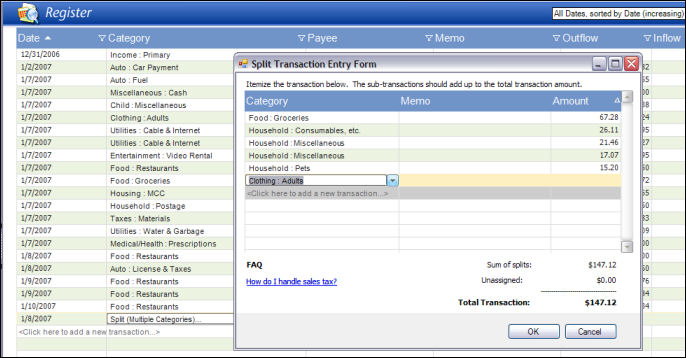
Unlike a couple of other budgeting programs I've used, split transactions (screenshot at right) are handled well in YNAB Pro. When using YNAB's Register to enter your expenses, you can break down those foot-long Wal-Mart receipts into as many different expense categories as you like. (Of course you'll want to use my Receipt Splitter spreadsheet to help you along. Hint, hint. Nudge, nudge.)
YNAB Pro's Budget Section
The brilliant idea inside YNAB, though, is this: Budget balances carry over from month to month. If you overspend in one category this month, the negative balance carries into next month's budget. Conversely, if you underspend in a category, you'll have excess funds ready to budget in the next month.
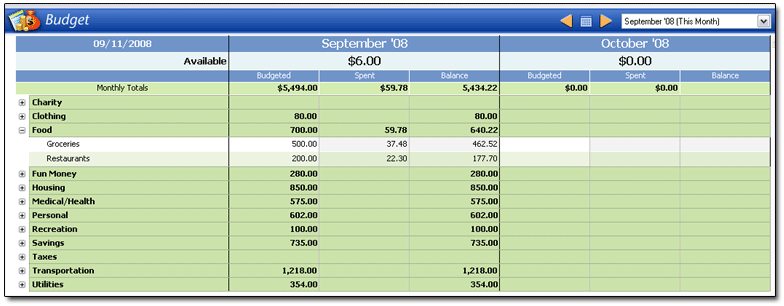
In the screenshot above, for the month of September 2008, I've budgeted $500 and $200 for my "Food:Groceries" and "Food:Restaurants" categories, respectively. The amounts you see in the SPENT column ($37.48 and $22.30) got there by virtue of the transactions I've entered in the Register. YNAB fills in the SPENT and BALANCE columns as you enter transactions in your Register.
Regarding Balances: In YNAB, you really have two kinds of "balances." You have account balances for your bank and credit-card accounts, of course, just as you would in any financial software. But you also have running Category balances which carry from month to month. Suppose you budget $500 for "Food:Groceries" spending in July, but you spend only $430 of it during the month. That $70 difference carries over and becomes part of your available "Food:Groceries" budget the next month. It's this very feature which makes YNAB Pro perfect for...
YNAB Pro and Freedom Accounts
Because of this month-to-month carryover, You Need a Budget is tailor-made for Freedom Account followers. Since budgeted balances carry from month to month in YNAB, it handles Freedom Accounts effortlessly. Just budget your Freedom Account amounts into YNAB each month, enter your Freedom Account expenses as they occur, and YNAB Pro handles the rest.
YNAB Pro and Zero-Based Budgeting
Zero-based budgeting, often referenced by Dave Ramsey (see my Total Money Makeover review), is golden with YNAB. Just make sure your planned spending in YNAB Pro's Budget section totals the same as the monthly income you list in the Register, and your zero-based budget is ready for liftoff. (Actually, making your YNAB Budget zero-based is what Jesse recommends. Spend every dollar before you get it ... but do it the right way!)
YNAB Pro and Envelope Budgeting
Intrigued with, or already a believer in, envelope-style budgeting? Well, Grandma's envelope-budgeting system just took a big step forward, because YNAB Pro will adapt just fine for that, too. Just change the starter YNAB budgeting category names to the names you'd use on your envelopes, and you're all set.
YNAB Pro and Downloading Transactions
In a software update that was just amazing to me, Jesse added a great feature to YNAB Pro: It can download and import transactions from your bank, in much the same way that Quicken and Money do. Personally, I rather enjoy plugging in my transactions by hand, but I know lots of folks who probably couldn't go on breathing if their money software didn't do bank-transaction downloads. In case you're unsure how big a deal this is, let me assure you:
It's bigtime.
YNAB Pro and the Scheduler
YNAB Pro offers a feature, called the Scheduler, which automatically inputs those transactions you encounter on a regular basis. Here's a screenshot of the Scheduler (click it to enlarge) if you're interested in more details. In it, I've entered a fictional monthly mortgage payment of $650 to Chase Mortgage:
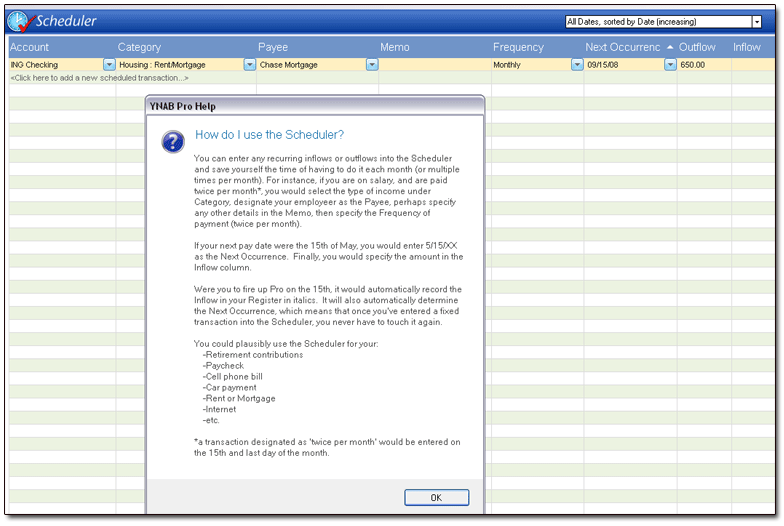
The Scheduler is a great idea — very much on par with the recurrring-transactions features found in Quicken and MS Money. If you're like me, and appreciate the ability to put chunks of your financial life on autopilot, then you'll use the heck out of the Scheduler.
YNAB Pro and Reports
If you're the sort of person who loves charts and graphs, then YNAB Pro will suit you just fine. The Reports section (screenshots below) let you see your income and spending (across lots of date ranges) in a big-picture format. And no, graphs in Quicken do not look this good.
Screenshots & Aesthetics
The very first thing I noticed about You Need a Budget Pro: Visually, it is gorgeous.
The overall look is very reminiscent of Outlook 2003. YNAB Pro does its magic in four interrelated sections: Register, Budget, Scheduler, and Reports. You can easily bounce back 'n' forth from section to section by using the four big tabs in the left-hand column. They're also reachable from the "View" option in the toolbar.
Section-specific help tips appear in the top portion of the left-hand column. Click these, and pop-up windows appear cleanly in the middle of your screen, answering questions that range from "How do I use the budget?" to "What is the difference between 'Primary' and 'Supplemental' income?"
Performance & Operation
YNAB Pro took 15 seconds to load on my laptop (Celeron-M 1.3GHz, 2 gigs RAM, Windows XP). For comparison, Quicken 2008 Deluxe loads in under 9 seconds. I'm not sure what this means, but there you go.
What Does Quicken Do That YNAB Pro Can't?
Good question.
YNAB Pro won't track your investments. It won't give you the option to generate 287 different asset-and-liability reports. It won't print checks, even if your printer is stocked with overpriced check blanks.
It won't show you random ads in the bottom right corner of your screen at all times. It won't allow you to track the value of your great aunt's Grand Canyon spoon collection on a minute-by-minute basis. (Well, I suppose it could do that, if you really wanted to. But then I'd also suggest that, right after you set this up in YNAB Pro, you seek quality psychiatric help.)
It also won't force you to buy a full-price upgrade (typically with quarter-price features added) every four or five years just to pad Intuit's bottom line.
Ahem.
And I'm a Quicken guy, mind you.
Pricing & Value
If you're going to make the effort and actually use YNAB Pro every month, then it's worth every penny of its $ price tag. If you'll let YNAB Pro do what it's capable of, and pay attention to what it tells you about your spending, then it will quickly repay you in savings that are multiples of its cost. A one-time payment of is nothing, and I mean nothing, compared to what you'll feel when you gain total control of your money.
Trust me on this.
I know.
However, if you're not serious about budgeting, and if you're not serious about improving your life, then don't bother. If you lack initiative and would rather watch your dollars consistently vanish up the chimney, then allow me to clarify for you now that $ is way too much to pay for any budgeting program. You'll get more mileage out of a nice set of dish towels. Or a can of lemon-scented Pledge.
Keep in mind, though, that dish towels typically don't have the power to help you pay cash — and pay easily — for Christmas. Or build up a pile of savings.
Or reduce your stress.
Or drastically improve your life.
Peripheral Materials & Such
I already mentioned the 48-page Setup Guide which accompanies YNAB Pro. In addition to that, Jesse's You Need A Budget website is fantastic. You could spend hours there — seriously — just absorbing the good information.
A recent addition to YNAB (the site) are its Forums. Check out what other users have to say, and, if you're using YNAB and need a bit of guidance, check back in and get the help you need. (These forums, in my opinion, were a great idea.)
For those of you who simply want to stalk Jesse, you can do so by following his YNAB Blog. Keep updated about new releases, heretofore-unthought-of uses for YNAB, and all the rest of that software-guru stuff.
Summary
Honestly, when I first saw what Jesse had accomplished with You Need a Budget Pro, I was stunned. I had to get up from my computer, walk around for a bit, and then come back to make sure I wasn't imagining all this. YNAB Pro looks so sharp and professional that I thought I'd fired up a program from a multimillion-dollar, publicly-traded software company.

Readers of this site know that I'm a Certified Spreadsheet Dork. Furthermore, I love my own Excel Spending Plan, which is the spreadsheet I created to help me manage my spending and saving on a monthly basis. With a few tweaks here and there, it's served me wonderfully for more than five years now. So perhaps the best indication I can give you, regarding my opinion of YNAB Pro, is that it has supplanted my Spending Plan spreadsheet as my budgeting tool of choice. I pretty much dig everything about it.
All I can say is that if budgeting is in your plans, you're shortchanging yourself if you don't test-drive You Need A Budget Pro soon.
In my opinion, YNAB Pro is easily the best all-around budgeting tool out there. 
Try YNAB PRO Now!
| Ratings are on a scale of 1 to 5, with 5 being the top ranking. | |
|
value: Is it worth the money? |  |
|
adaptability: Could this work for me over time? | 
|
|
usage: Is its usage intuitive? Is it professional in appearance and function? |
|
